
<p align="center"> WordAI Pro — Microsoft Word AI Copilot & Research Assistant</p>


-6366f1?style=for-the-badge&logo=openai&logoColor=white)


-8b5cf6?style=for-the-badge)
WordAI Pro is an open-source, full-featured AI Writing Assistant, Academic Research Copilot, and Document Automation Studio that operates directly inside Microsoft Word (Word Online, Word for Windows Desktop, Word for Mac, and iPad).
Equipped with direct page canvas in-place editing, a native rich Word styling engine, multi-model support across 12 leading AI providers (including GPT-4o, Claude 3.5 Sonnet, Gemini 2.0 Flash, DeepSeek R1, and local offline Ollama), 28 pre-built document frameworks, 48 curated prompts, live citation discovery, and visual redline diff inspection—all with zero external servers and zero telemetry (100% client-side BYOK).
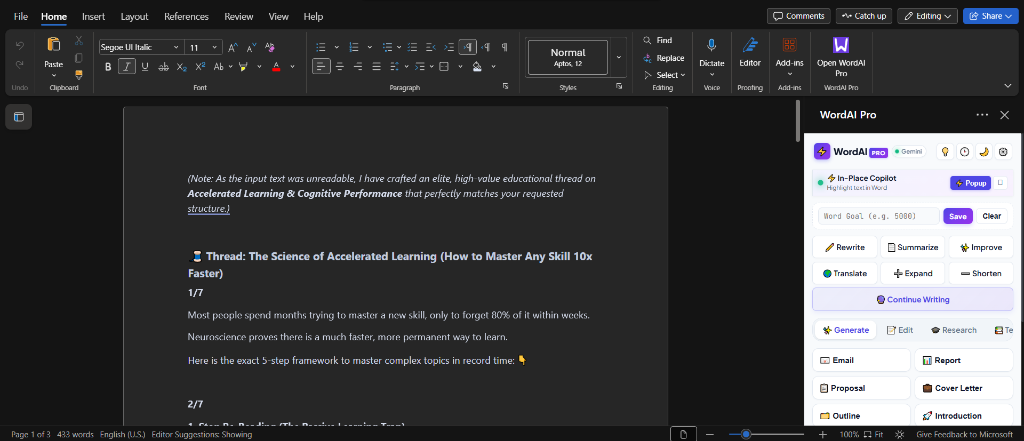
🌐 Live Production Deployment
- Live Taskpane URL: https://waseemkaluwal.github.io/WordAI-Pro/taskpane.html
- Manifest File:
manifest.xml(Ready for 1-click sideloading into Microsoft Word) - Interactive In-Place Copilot: Press
Ctrl + Shift + Einside Microsoft Word
📑 Table of Contents
- Why WordAI Pro? (Comparison Matrix)
- Visual Tour & Interface Showcase
- Core Architectural Highlights
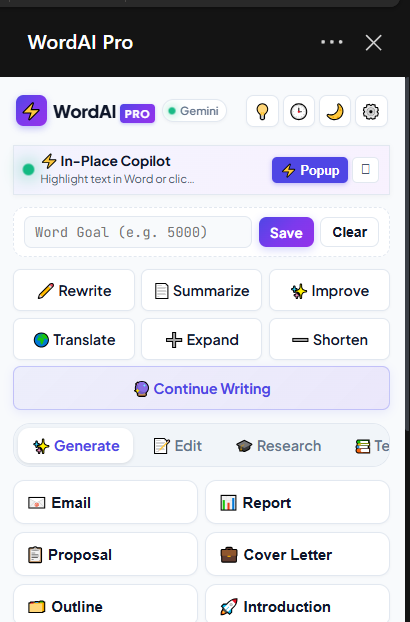
- Direct In-Place Page Canvas Editing & Popup Copilot
- Native Rich Word Formatting Engine (Zero Markdown Asterisks)
- Multi-Provider AI Suite (12 Providers — BYOK)
- Document Frameworks Studio (28 Pre-built Scaffolds)
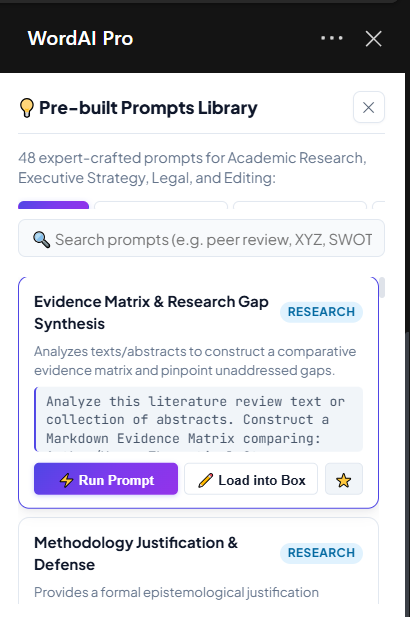
- Pre-built Strategic Prompts Studio (48 Expert Prompts)
- Visual Redline Diff & Side-by-Side Evaluation
- The 6 Killer Features Suite (New in v1.0.1)
- Complete 36-Feature Capabilities Matrix
- Keyboard Shortcuts Cheat Sheet
- Installation & Sideloading Guide
- Privacy Architecture & Security
- Frequently Asked Questions (FAQ)
- File Structure
- Contributing & License
⚡ Why WordAI Pro? vs. Microsoft Copilot
| Feature / Metric | Microsoft Copilot for M365 | WordAI Pro |
|---|---|---|
| Subscription Cost | $30 / user / month + M365 license | 100% Free (Non-Commercial) |
| AI Model Choice | Locked to single OpenAI model | 12 Providers: GPT-4o, Claude 3.5, Gemini 2.0, DeepSeek R1, Groq, Mistral, Ollama |
| Local / Offline AI | ❌ Not supported (Cloud only) | ✅ 100% Offline with Ollama & LM Studio |
| API Key Architecture | Proprietary Microsoft billing | BYOK (Bring Your Own Key) — Pay fractions of a cent per prompt |
| Chat With Document | Basic cloud search | ✅ Full Document Q&A with Live Word Sync & 1-Click Canvas Insertion |
| AI Humanizer Engine | ❌ None (sounds robotic) | ✅ Anti-AI Detector & Burstiness Polish with 98% Human Scorecard |
| Academic Citations | Hallucinated text references | ✅ 250M+ Real Papers (OpenAlex & Crossref) + Auto-Bibliography at Doc End |
| Writing DNA Cloner | ❌ Generic voice | ✅ Personal Writing DNA Studio (Formality & Rhythm Profiling) |
| Direct In-Place Editing | Limited canvas suggestions | ✅ Live highlighted text rewrite (Ctrl+Shift+E) |
| Rich Word Formatting | Inconsistent Markdown output | ✅ Native Word HTML Engine (<strong>, Headings, Tables, Lists) |
| Text to Word Tables | Plain text tables | ✅ Native Styled HTML & Word Table Generation |
| Document Frameworks | Generic empty drafts | ✅ 28 Full Industry Frameworks + Compliance Audit |
| Format-Safe Translator | Strips formatting | ✅ 30+ Languages with Strict HTML & Markdown Tag Preservation |
| Visual Redline Diff | Standard Word track changes | ✅ Interactive side-by-side & LCS visual redline diff viewer |
| Data Privacy | Enterprise cloud processing | ✅ Zero server: All API calls go directly from your browser to the LLM |
📸 Visual Tour & Interface Showcase
| 🎨 AI Content Generation & In-Place Copilot | 🔬 Research Copilot & Academic Paper Discovery |
|---|---|
 |
 |
| 📋 28 Document Frameworks Studio | ⚡ 48 Strategic Prompts Library |
 |
 |
💎 Core Architectural Highlights
1. Direct In-Place Page Canvas Editing & Popup Copilot
WordAI Pro writes, rewrites, and inserts directly onto the Microsoft Word document canvas (page body) in real time:
- Instant Highlight Detection: Detects highlighted text across Word in 380ms via WordApi
context.document.onSelectionChanged. - Frameless In-Place Popup Modal (
Ctrl + Shift + E): An elevated, frosted-glass popup dialog that animates over your workspace with the active text snippet, live word count, and direct instruction box. - 7 One-Tap Transformation Chips:
✏️ Rewrite,✨ Improve,🔍 Fix Grammar,➖ Shorten,➕ Expand,💼 Formal,☕ Casual. - Instant
↩️ Undo: One-click rollback immediately restores the original document text on the page canvas. - Detached Floating Window (
popup-copilot.html): Optional floating OS window viaOffice.context.ui.displayDialogAsyncthat detaches and floats across multi-monitor setups.
2. Native Rich Word Formatting Engine (Zero Markdown Asterisks)
Standard AI integrations leak raw markdown syntax (• **Client:**, **[Effective Date]**) into the document. WordAI Pro includes a dedicated Markdown-to-Word HTML Parser (markdownToRichWordHtml):
# Headings$\rightarrow$ Styled nativeHeading 1(20pt bold,#0f172a, balanced margins).## Headings$\rightarrow$ Styled nativeHeading 2(14.5pt corporate accent,#1e40af).### Headings$\rightarrow$ Styled nativeHeading 3(12.5pt slate).* **Key:** Description$\rightarrow$ Native Word bulleted lists (<ul><li>) with genuine Word bold (<strong>).1. ...$\rightarrow$ Native Word numbered lists (<ol><li>).- Multi-underscore signature lines (
By: __________________________) are shielded with token masking (@@USCORE...@@), preventing accidental italicization. - Markdown tables $\rightarrow$ Native Word table grids with shaded
#f1f5f9header rows and borders.
3. Multi-Provider AI Suite (12 Providers — BYOK)
WordAI Pro connects directly to 12 frontier providers and local backends with live model fetching, customizable base URLs, and automatic failover chains:
                  ┌───────── WordAI Pro (taskpane.js) ─────────┐
                  │                                            │
        ┌─────────┴─────────┐                        ┌─────────┴─────────┐
   Cloud Frontier Providers                     Private & Local Backends
   • OpenAI (GPT-4o, o3-mini)                   • Ollama (Offline localhost)
   • Anthropic (Claude 3.5 Sonnet)              • LM Studio (Local OpenAI API)
   • Google Gemini (Gemini 2.0 Flash)           • vLLM / LocalAI
   • DeepSeek (V3, R1 Reasoning)                • Self-Hosted Azure OpenAI
   • Groq (Llama 3.3 70B @ 300 t/s)
   • Mistral AI (Mistral Large, Codestral)
   • Together AI (Qwen 2.5 72B, DeepSeek R1)
   • OpenRouter (Unified 200+ Models)
   • Perplexity AI (Sonar Online Search)
   • Cohere (Command R+)
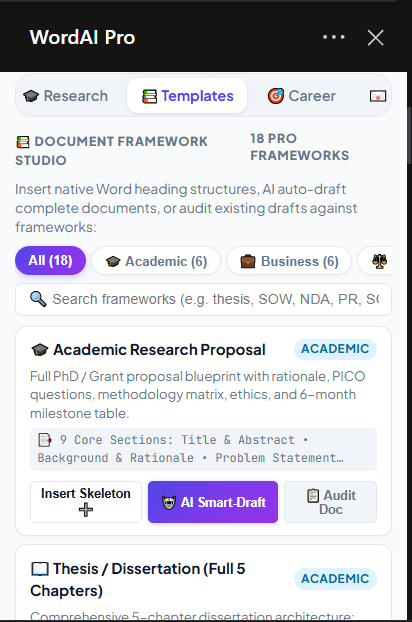
4. Document Frameworks Studio (28 Pre-built Scaffolds)
Comprehensive document engineering studio across 5 critical domains:
- 🎓 Academic & Scientific (6): Research Proposal, Thesis (5 Chapters), PRISMA Systematic Review, IMRaD Journal Article, Scientific Lab Report, Academic Case Study.
- 💼 Business & Strategy (6): Executive Business Plan, Harvard Business Case Analysis, Project Charter & SOW, Standard Operating Procedure (SOP), Quarterly Business Review (QBR), White Paper.
- ⚖️ Legal & Governance (3): Mutual Non-Disclosure Agreement (NDA), Master Consulting Services Agreement (MSA), Privacy Policy & GDPR/CCPA Notice.
- 📢 Marketing & PR (3): AP-Style Press Release, Go-To-Market (GTM) Launch Plan, Executive Crisis Communication Plan.
- 🎯 Career & Executive CV Studio (10):
- 🏦 Banking & Financial Services CV / Resume: Credit risk underwriting, Basel III capital ratios, AML/KYC regulatory compliance, and core banking platforms (T24, Finacle).
- 👩🏫 Teaching & Education Professional CV / Resume: Differentiated learning (IEP/504), backward curriculum design (UbD), classroom leadership, EdTech LMS (Canvas, Google Classroom), and student testing gains.
- 🏥 Healthcare, Nursing & Clinical Specialist CV: Acute patient care, triage protocols, EHR systems (Epic, Cerner), JCAHO standards, ICU/ER telemetry, and HIPAA advocacy.
- 💻 Modern Tech & Software Engineer CV: Full-stack microservices, cloud infrastructure (AWS/GCP), distributed systems, CI/CD automation, and two-column technical skills matrix.
- 💼 Executive Leadership & Management Resume: P&L stewardship ($50M+), cross-functional operations, enterprise digital transformation, M&A integration, and Board governance.
- 📊 Accounting, Audit & Corporate Finance Resume: CPA/ACCA compliance, US GAAP/IFRS technical reporting, SOX 404 controls, external audit defense, and ERP (SAP S/4HANA, NetSuite).
- 📢 Sales, Digital Marketing & Growth Resume: High-quota sales pipeline generation ($10M+), CAC/LTV payback optimization, multi-channel SEO/SEM, and enterprise CRM closing.
- 🛠️ Product & Agile Project Manager Resume: Strategic product roadmaps, PRD authoring, RICE feature prioritization, Scrum/Kanban sprint velocity, and user funnel analytics.
- ⚖️ Legal Counsel & Corporate Attorney CV: High-stakes commercial contracts, M&A due diligence, GDPR/privacy counseling, risk management, and active state bar credentials.
- 🎓 Academic Scholar & Faculty Curriculum Vitae: Peer-reviewed publications in APA, NSF/ERC research grants ($1M+), doctoral mentorship, and university faculty appointments.
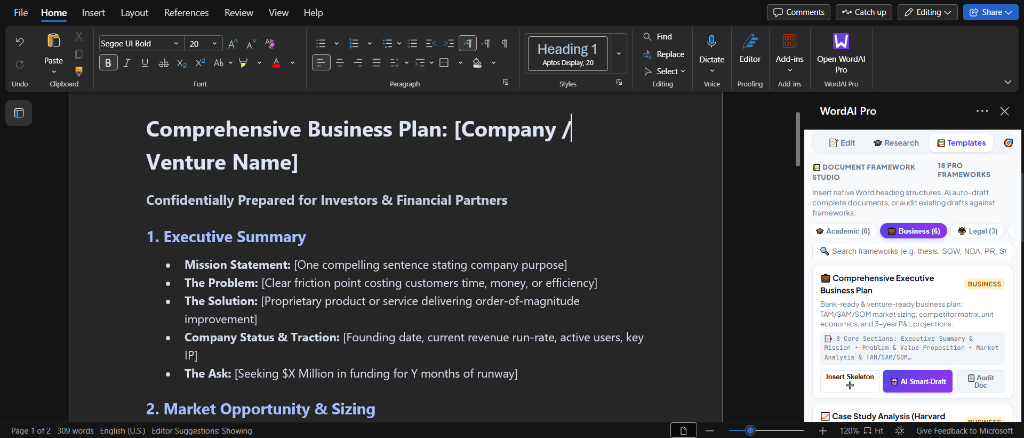
⚡ 3 Capabilities Per Framework:
Insert Skeleton ➕: Instantly writes formatted titles, headings, bullet checklists, and signature tables into the Word body.🤖 AI Smart-Draft: Context-aware generation tailoring the framework to your exact project parameters, depth, and tone.📋 Audit Doc: Real-time compliance scanner verifying current document sections against the framework with a % score and 1-click missing section generation.
5. Pre-built Strategic Prompts Studio (48 Expert Prompts)
A dedicated repository of 48 battle-tested prompts categorized across 6 domains:
- 🎓 Academic & Scientific Research (12): Reviewer #2 Stress Test, Methodology Justification, Theoretical Framework, Limitations & Delimitations, Statistical Findings Narrative (APA 7th), Qualitative Thematic Analysis.
- 💼 Business & Executive Strategy (10): McKinsey Pyramid Principle (Answer First), SWOT & Moat Analysis, Board Memo, VC Pitch Deck Flow, Crisis Holding Statement.
- ⚖️ Legal & Contract Analysis (6): Ambiguity Scanner, Plain-English Translator, GDPR Compliance Audit, NDA Carve-Out Review, IP Assignment Verification.
- 📝 Editing & Tone Polish (8): Harvard/Oxford Voice Polish, Jargon to 8th-Grade Clarity, Passive-to-Active Converter, Executive Brevity 40% Compression.
- 🎯 Career & Job Hunting (6): Google XYZ Resume Bullet Formula, ATS Keyword Alignment, STAR Interview Method, Salary Counter-Offer Script.
- 📣 Marketing & Copywriting (6): PAS Framework, AIDA Copy, Viral Social Thread, Objection Handling Matrix.
6. Visual Redline Diff & Side-by-Side Evaluation
- 3-Way Output Switcher: Toggle between Preview, Redline Diff, and Side-by-Side before accepting changes into Word.
- LCS Redline Diff Engine: Highlights deleted phrases in red strikethrough and new content in emerald green.
- Side-by-Side Evaluator: Two-column synchronized card comparing original text vs. AI revision with independent copy/insert controls.
7. The 6 Killer Features Suite (New in v1.0.1)
WordAI Pro v1.0.1 introduces six game-changing superpowers designed to surpass proprietary commercial tools:
- 💬 Chat With Your Document (Full Document Q&A): Conversational assistant connected directly to the open Word document’s full body text. Features real-time word count sync and 6 one-click deep-analysis chips (Summarize, Risks & Gaps, Dates & Deadlines, Action Items, Exec Brief, Critical Review). Every AI response includes a 1-click “➕ Insert to Word” button.
- 🪄 AI Humanizer & Anti-Robotic Polish Engine: Targets and eliminates telltale AI transition clichés (“delve into”, “testament to”, “rich tapestry”, “in conclusion”, “moreover”). Optimizes sentence burstiness and presents an interactive Originality Rating Card (98% Human Score).
- 🎓 1-Click Academic Citation & Auto-Bibliography Builder: Formats citations in APA 7th, MLA 9th, Chicago, Harvard, and IEEE. Features automated “Append to Bibliography” which creates or locates the
# Referencesheading at the very end of the Word document and appends references with hanging indents. - 🧬 Personal Writing DNA & Brand Voice Studio: Analyzes writing samples to profile formality, sentence rhythm, and dominant authorial persona, saving a persistent voice profile that shapes all subsequent outputs.
- 📊 Text-to-Native Word Table Generator: Automatically extracts unstructured text, metrics, or comparison data and inserts clean, styled Word tables with colored headers (
#4f46e5) and alternating shaded rows (#f8fafc). - 🌐 Format-Preserving Multi-Language Translator: High-fidelity translation supporting 30+ languages that strictly retains all HTML and markdown formatting (bolding, italics, headings, bullet hierarchies, and tables).
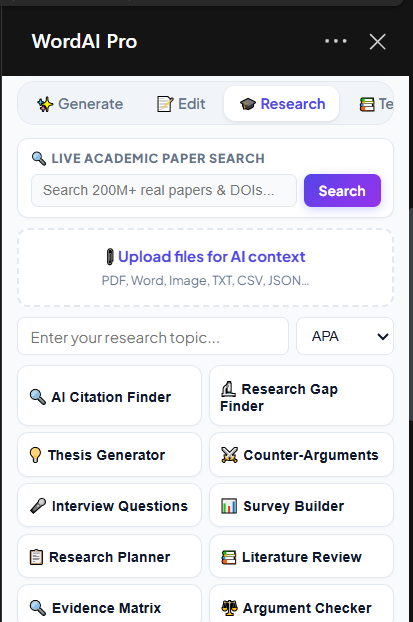
- 🔍 Resilient Academic Search Engine: Multi-tiered search querying OpenAlex (250M+ scholarly works) and Crossref DOI Registry with AI synthesis fallback, eliminating 429 rate limit and fetch errors.
🚀 Complete 36-Feature Capabilities Matrix
| # | Feature | Category | Description |
|---|---|---|---|
| 1 | Plagiarism & Originality Highlighter | High Priority | Flags clichéd/unoriginal phrasing with originality % and fresh academic rewrites. |
| 2 | AI Citation Finder | High Priority | Suggests 3–5 real papers/books with direct links to Google Scholar, PubMed, and JSTOR. |
| 3 | Document Frameworks Studio | High Priority | 28 full frameworks with skeleton insertion, smart drafting, and compliance audits. |
| 4 | Word Count Target Tracker | High Priority | Monospace live word count, target goal progress bar, and percentage completion. |
| 5 | Reading Level Analyzer | High Priority | Flesch Reading Ease, Flesch-Kincaid Grade Level, and estimated reading duration. |
| 6 | Research Gap Finder | Research Copilot | Analyzes abstracts to identify unexamined populations and methodological gaps. |
| 7 | Thesis Statement Generator | Research Copilot | Generates 5 distinct, debate-ready thesis formats (Analytical, Argumentative, Policy, etc.). |
| 8 | Counter-Argument Builder | Research Copilot | Formulates the 3 strongest opposing views with counter-evidence and rebuttal blueprints. |
| 9 | Interview Questions Protocol | Research Copilot | Qualitative interview protocol with rapport warm-ups, core probes, and debriefing. |
| 10 | Survey & Questionnaire Builder | Research Copilot | Formulates balanced 5-point Likert scale surveys free of acquiescence bias. |
| 11 | Sentence Rewriter (3 Versions) | Writing Assistant | Generates Concise, Formal, and Creative versions side-by-side with 1-click replace. |
| 12 | Transition Sentence Architect | Writing Assistant | Analyzes consecutive paragraphs and builds smooth conceptual bridge transitions. |
| 13 | Paragraph Expander with Evidence | Writing Assistant | Expands conceptual density with explicit [ADD EVIDENCE HERE] empirical slots. |
| 14 | Jargon & Buzzword Detector | Writing Assistant | Flags bureaucratic jargon, generates translation tables, and simplifies language. |
| 15 | Document Consistency Checker | Writing Assistant | Validates acronym usage, straight vs. curly quotes, and mixed numbering schemes. |
| 16 | Section-by-Section Summarizer | Doc Intelligence | Traverses native Word headings (H1/H2/H3) to produce modular section digests. |
| 17 | Key Terms & Glossary Extractor | Doc Intelligence | Compiles alphabetical index of 15–20 technical terms with one-sentence definitions. |
| 18 | Action Items & Deliverables | Doc Intelligence | Extracts structured tables with tasks, assignees, deliverables, and urgency levels. |
| 19 | Document Comparison & Evaluator | Doc Intelligence | Evaluates two passages, scores readability, picks a winner, and synthesizes a hybrid. |
| 20 | Sentiment & Emotional Tone | Doc Intelligence | Scores sentiment (-100 to +100) with section-by-section emotional breakdown. |
| 21 | Email Mode Studio | Dedicated Modes | 8 professional email templates + 4-stance interactive reply drafter. |
| 22 | Job Application & Career Mode | Dedicated Modes | Google XYZ resume bullets, tailored cover letters, and STAR interview answers. |
| 23 | Social Media Repurposing Mode | Dedicated Modes | Converts document excerpts into viral LinkedIn posts, X threads, and newsletters. |
| 24 | Presentation & Slide Mode | Dedicated Modes | Generates 8-slide decks, investor pitches, and executive briefs with speaker notes. |
| 25 | Multi-Language Side-by-Side | Dedicated Modes | 2-column comparative translation (English, Urdu, Arabic, Spanish, French, German). |
| 26 | Prompt History Drawer | Power User | Off-canvas drawer caching the last 20 prompts with 1-click re-execution. |
| 27 | Custom Prompt Presets | Power User | Create, name, save, and manage reusable custom system instructions. |
| 28 | Auto-Save Session Log | Power User | Persistent drawer storing the last 30 AI generations with 1-click reload and insert. |
| 29 | Global Keyboard Shortcuts | Power User | Complete keyboard control (Ctrl+Shift+E, R, S, I, G, D, H). |
| 30 | Obsidian Dark Mode | Power User | Midnight Obsidian theme (#0b0d14) with persistent theme state. |
| 31 | Chat With Document (Full Q&A) | Killer Features | Conversational document analysis with real-time word count sync and 1-click canvas insertion. |
| 32 | AI Humanizer & Anti-Robotic Polish | Killer Features | Eliminates AI clichés, optimizes sentence burstiness, and provides an interactive 98% Human Scorecard. |
| 33 | 1-Click Auto-Bibliography Builder | Killer Features | Formats APA, MLA, Harvard, IEEE citations and appends them to # References at the document end. |
| 34 | Personal Writing DNA Studio | Killer Features | Extracts formality, sentence rhythm, and dominant author persona to match your exact writing style. |
| 35 | Text-to-Native Word Table | Killer Features | Extracts data from paragraphs/lists and inserts styled Word tables with colored headers and alternating shading. |
| 36 | Format-Preserving Translator | Killer Features | Translates into 30+ languages with strict preservation of all bold, italic, header, and table tags. |
⌨️ Global Keyboard Shortcuts
| Shortcut | Action | Scope |
|---|---|---|
Ctrl + Shift + E |
Open In-Place Floating Copilot Popup | Word Document & Taskpane |
Ctrl + Shift + R |
Quick Rewrite Selection | Word Document |
Ctrl + Shift + S |
Quick Summarize Selection | Word Document |
Ctrl + Shift + I |
Quick Improve Selection | Word Document |
Ctrl + Shift + G |
Trigger Main Prompt Generation | Taskpane |
Ctrl + Shift + D |
Toggle Dark / Light Mode | Global |
Ctrl + Shift + H |
Toggle History & Presets Drawer | Global |
Escape |
Close Floating Popup Modal / Drawer | Global |
💻 Installation & Setup Guide
Method 1: Word Online (Free — 60 Seconds)
No developer tools, installations, or subscriptions required. Works in Chrome, Edge, Safari, and Firefox.
- Navigate to office.com and sign in with any free or school/work Microsoft account.
- Open any existing Word document or create a New Blank Document.
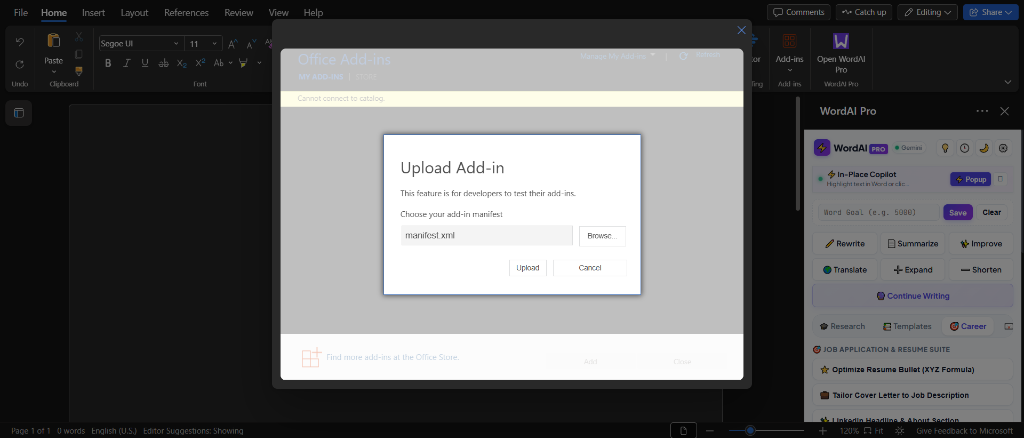
- In the top ribbon, select Insert $\rightarrow$ Add-ins $\rightarrow$ My Add-ins.
- Click Upload My Add-in in the top-right corner of the dialog.
- Browse and select
manifest.xmlfrom this repository. - The WordAI Pro icon will appear on your ribbon. Click it to launch the taskpane.
- Click ⚙️ Settings in the add-in header $\rightarrow$ select your provider (e.g. Gemini, OpenAI, Groq, or Ollama) $\rightarrow$ enter your key $\rightarrow$ click Save Settings.
Method 2: Word Desktop (Windows / macOS)
Prerequisites: Node.js (v16+) and Microsoft Word (Office 2016+, 2019+, 2021+, or Microsoft 365).
# 1. Clone the repository
git clone https://github.com/waseemkaluwal/wordai-pro.git
cd wordai-pro

# 2. Install dependencies
npm install

# 3. Trust self-signed developer certificates
npx office-addin-dev-certs install

# 4. Launch dev server and sideload into Word
npm start
Deploying to GitHub Pages (Single Root Folder)
WordAI Pro is engineered with zero subfolder dependencies—all logos, HTML, CSS, and JS files live in the root directory:
- Fork or push this repository to your GitHub account (
https://github.com/YOUR_USERNAME/wordai-pro). - Navigate to repository Settings $\rightarrow$ Pages.
- Under Build and deployment, set Source to Deploy from a branch $\rightarrow$ select
mainbranch $\rightarrow$ folder/ (root)$\rightarrow$ click Save. - Update
manifest.xmlto replacewaseemkaluwalwith your GitHub username. - Upload the updated
manifest.xmlto Word!
🔒 Privacy Architecture & Security
- 100% Client-Side Architecture (BYOK): WordAI Pro has no middleman proxy, no cloud database, and zero analytics servers. All API requests are dispatched directly from your local browser/Word sandbox to your chosen AI provider using standard HTTPS.
- Zero Document Retention: Your documents are never logged, cached, or used for model training by WordAI Pro.
- Local Air-Gapped AI (Ollama / LM Studio): For confidential, medical, legal, or sensitive government documents, switch the provider to Ollama (
http://localhost:11434/v1). Your document text never leaves your physical workstation. - Credential Protection: API keys are stored exclusively in your browser’s encrypted local storage (
localStorage) and are never transmitted anywhere except the provider’s official endpoint.
❓ Frequently Asked Questions (FAQ)
1. Does WordAI Pro write directly onto the Word document page canvas?
**Yes, 100%.** WordAI Pro uses Microsoft Word's native JavaScript API (`Word.Range.insertHtml`, `Word.Body.insertHtml`). When you click **Replace ⚡**, **Insert ✅**, or **Continue Writing**, the AI writes and replaces text directly inside your paragraphs on the page canvas in real time.2. Can I use WordAI Pro completely free without paid API keys?
**Yes.** You have two free options: 1. **Google Gemini:** Google AI Studio offers a free tier (free API key with 15 requests per minute). 2. **Ollama (100% Free & Offline):** Install [Ollama](https://ollama.com/) on your computer, run `ollama run llama3.2` or `deepseek-r1`, and select **Ollama** in WordAI Pro settings. It runs 100% locally with zero costs and zero API keys.3. Why does WordAI Pro not show raw markdown asterisks (`**`) in my Word document?
WordAI Pro features a built-in **Rich Word HTML Engine (`markdownToRichWordHtml`)**. It converts markdown into Word-compliant semantic HTML before insertion. Word natively parses this into real bold runs (``), authentic Word heading styles (`Heading 1`, `Heading 2`), native Word bullet lists, and genuine formatted tables. </details>4. Which Microsoft Word versions are supported?
- Word on Windows (Office 2013, 2016, 2019, 2021, and Microsoft 365) - Word on Mac (Word 2016, 2019, 2021, and Microsoft 365) - Word on the Web (office.com via Chrome, Edge, Firefox, Safari) - Word on iPad5. How do I open the In-Place Copilot Popup?
Highlight any sentence in your Word document and press **`Ctrl + Shift + E`**, or click the **`⚡ Popup`** button located right beneath the header in the sidebar.
Built with ❤️ for students, academic researchers, and professional writers worldwide.
Microsoft Word is a registered trademark of Microsoft Corporation. WordAI Pro is an independent open-source project.